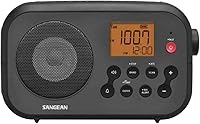
What to Look for in a Weather Radio
Look for three things in a weather radio: SAME county programming, a backup power source and an alert method you will notice. SAME narrows alerts to your county, batteries or a crank keep the radio alive in a blackout, and a siren, voice or light decides whether you actually wake up.
On this page (8 sections)
- What is SAME programming and why does it matter most?
- Which alert method will actually wake you?
- Why does backup power matter more than you think?
- How do you check reception before you commit?
- What else is worth paying for?
- Which type of weather radio fits your home?
- How should you set up the radio so it works when needed?
- The bottom line on choosing a weather radio
Look for three things in a weather radio: SAME county programming, a backup power source and an alert method you will notice. SAME narrows alerts to your county, batteries or a crank keep the radio alive in a blackout, and a siren, voice or light decides whether you actually wake up.
Everything else is a bonus.
A weather radio is only as useful as the warning it delivers at 3 a.m. A radio that scans every channel in the region but never wakes you has done nothing.
The checklist below turns a crowded market into a short list you can act on.
We compared the specs and features of Midland's alert radios to show what each feature does in practice. For a shortlist of finished picks, see our roundup of the best NOAA weather radios.
What is SAME programming and why does it matter most?
SAME is the one feature that separates a useful weather radio from a noisy one. SAME stands for Specific Area Message Encoding, and it lets you enter a code for your county so the radio filters alerts to that area.
The Midland WR400 and WR120B both use S.A.M.E. programming to connect to your county's warning system.
Without SAME, the radio reacts to every alert broadcast on the channel. That channel may cover several counties, so you get warnings for storms 60 miles away and start ignoring the alarm.
A SAME radio stays quiet until your county is threatened.
How to find your SAME code and program it
The National Weather Service publishes a SAME code for every county in the country. You enter that six-digit code into the radio during setup.
The WR120B accepts codes for up to 25 counties. The WR400 accepts up to 25 as well and gives you 80 different emergency alert types to choose from.
Add your home county first. Then add any county within about 20 miles, plus the county where you work or where your children go to school.
A warning issued there still matters to you even if your house is outside the polygon.
Some radios also let you choose partial-county codes. If your county is large and storms usually hit one corner, ask your local emergency manager whether a partial code fits better.
A radio set up this way avoids alerts from a distant part of the same county.
Program SAME before you rely on the radio. A weather radio with no county code is just an expensive scanner.
The Midland WR120B review walks through its S.A.M.E. setup step by step.
Which alert method will actually wake you?
The alert method decides whether the warning reaches you at all. Midland's radios offer three choices: a loud siren, a voice announcement or a flashing light.
Each works for a different person and a different time of day.
An 85 dB siren is the loudest option. Midland puts that siren in the WR400, and it is loud enough to cut through rain, wind and a closed bedroom door.
Voice alerts read the warning in plain language and suit people who want detail without getting up. A visual LED flasher helps anyone with hearing loss and adds a second cue in a dark room.
Think about where the radio sits. A radio in a kitchen may not be heard from a second-floor bedroom.
A radio next to the bed wakes you but may be far from the safest room in the house. Many households put one radio near the bed and rely on phone alerts elsewhere.
The WR400 automatically switches from AM/FM mode to all-hazard alerts, so you don't have to change modes when a warning arrives. That matters if the radio is also your bedside music source.
Choosing between siren, voice and light alerts
Pick the siren if your main worry is sleeping through a nighttime tornado warning. Pick voice alerts if you want to hear what the warning says without reading a screen.
Pick the flasher, or a model with both, if someone in the home is hard of hearing or if the radio sits where sound is muffled.
Test the alarm in daylight before storm season. Set off the test alert and stand in each bedroom to judge whether you would hear it.
If the answer is no, move the radio or add a second one.
Why does backup power matter more than you think?
The weather that triggers the warning is often the same weather that cuts your power. A radio plugged into the wall can go silent exactly when the alert matters most.
That is why a battery backup or a crank belongs on the checklist, not at the bottom of it.
The Midland WR400 runs on four AA batteries when the power fails. Midland lists emergency power backup as part of its warning system, so the radio keeps working during outages.
The batteries are not included, so buy a set when you buy the radio.
The WR120B also runs on batteries as well as an AC adapter. The ER310 goes further and offers multiple power sources, including a crank.
A crank radio needs no batteries at all, though you do have to turn the handle.
A radio that takes standard AA or AAA batteries is the easiest to keep ready. Store a fresh pack beside the radio and replace it once a year.
Rechargeable batteries work too, as long as you keep them topped up.
Check the power plan before you buy. Decide whether you want battery backup, a crank, or both.
Then confirm what the radio takes and whether those batteries are included.
The WR400 needs four AA batteries that you supply; the ER310 ships with six AA batteries included.
How do you check reception before you commit?
Reception decides whether the radio hears the alert at all. NOAA broadcasts on several VHF channels in the 162 MHz band.
Midland's radios scan the weather band channels and lock onto the strongest one. If your location can't receive a strong signal, the radio cannot help you.
Test reception in the exact spot where the radio will live. Tune to a weather channel and listen for a clear, steady broadcast.
An indoor spot near a window usually works better than a basement corner. If the signal is weak, raise the antenna or move the radio to an upper floor.
The WR400 and WR120B both scan the weather channels for you. The WR400 scans 10 available weather band channels and locks onto the strongest.
That automatic scan saves you from hunting for a signal by hand.
If the radio will sit in a basement or a metal building, expect trouble. Plan a spot near a window or run an external antenna if the model supports one.
Our guide to weather radio frequencies explains the seven channels and why some reach farther than others.
Testing reception in the real spot
Place the radio where it will actually sit, extend the antenna and let the scan finish. Listen for static and dropouts, not just whether a voice comes through.
A channel that sounds clear in the store may be marginal at your address.
Test the radio during a normal broadcast, not a severe event. You want to hear the routine programming clearly so you know the signal is steady.
Then run the required weekly test alert if your model offers one.
Reception is a placement problem more than a radio problem. Before you return a radio that seems deaf, try a different window, a higher floor or a longer antenna.
What else is worth paying for?
Once SAME, alert type and power backup are settled, a few extras make the radio easier to live with. The WR400 includes a built-in clock with an alarm and snooze button plus an AM/FM radio.
It also has a USB output for charging small devices.
The clock matters more than it sounds. A weather radio that doubles as an alarm clock stays plugged in and switched on, which means it is ready when an alert arrives.
A radio kept in a drawer is not.
The AM/FM radio gives you local coverage during a long outage. When the weather service broadcast goes quiet between alerts, a local station keeps you informed.
The WR400 automatically switches from AM/FM to hazard alerts without you touching a dial.
The USB output lets you charge a phone from the radio, which helps during a blackout. Check what the output can charge before you count on it for a tablet or a larger device.
The WR120B keeps things simpler. It offers continuous backlighting, color-coded alert indicators and an alert override that switches to warn of danger.
The color coding tells you the alert type and severity at a glance.
When a simpler radio is the better buy
A simpler radio is the better buy when you already have an alarm clock and a phone charger. The WR120B covers SAME programming, multiple alert types and battery operation without the clock and radio extras.
If the radio's only job is to warn you, the simpler model leaves fewer things to set up.
Choose the WR400 when you want one device on the nightstand that wakes you, warns you and charges your phone. Choose the WR120B when you want the warning without the extras.
Which type of weather radio fits your home?
There are three practical types to choose from: a plug-in alert radio for the home, a portable crank radio for outages and travel, and a handheld scanner for people who move around. The right type depends on where you spend your time and what you want the radio to do.
A plug-in alert radio like the WR120B or WR400 sits in one place and stays ready. It runs on wall power with battery backup and sounds an alarm when your county is threatened.
This is the type most households need.
A crank radio like the ER310 adds a crank and a flashlight. Midland lists multiple power sources, an SOS emergency flashlight and NOAA Weather Scan + Alert on it.
It suits camping, travel and homes that lose power often. It ships with six AA batteries included.
A handheld scanner suits people who want to monitor many channels. It is not the same tool as a dedicated weather radio.
A scanner needs more setup and may not wake you with a siren.
Matching the radio to your routine
For most homes, buy a plug-in SAME alert radio for the bedroom or kitchen. Add a crank radio if you camp, travel or lose power regularly.
A handheld scanner is for hobbyists who want to listen to more than weather.
Pick the type first, then the model. The type narrows the features you need.
A crank radio that stays in a kitchen drawer wastes its crank; a plug-in radio that lives in a tent has no outlet.
How should you set up the radio so it works when needed?
Set up the radio the day you bring it home, not the day a storm is forecast. The setup takes about 15 minutes: program SAME, pick an alert type, test the signal and store spare batteries.
Start with the county code. Enter your home county and any nearby counties that matter.
Then choose your alert type and set the volume high enough to wake you.
Place the radio near a window and extend the antenna. Run the weather scan and let it lock onto the strongest channel.
Listen to the routine broadcast for a minute to confirm the signal is clear.
Then run a test. If the radio has a test alert feature, use it and listen from each bedroom.
Adjust the volume or move the radio until you can hear it.
Store spare batteries beside the radio. For the WR400, that means four AA batteries.
For the WR120B, keep the right size on hand. Replace them once a year on a date you will remember.
Keeping the radio ready between storms
Check the radio once a month. Confirm it is plugged in or has fresh batteries, the antenna is up and the channel is still clear.
A radio that lost power in a previous outage may still be sitting silent.
Replace batteries on a schedule rather than waiting for them to fail. A radio that works only when the power is on is a fair-weather radio.
The whole point is the night the power goes out.
Set a monthly reminder. A minute of checking beats discovering a dead radio during a tornado warning.
If the radio stops alerting, our guide to why your NOAA weather radio isn't working covers the common causes.
The bottom line on choosing a weather radio
What to look for in a weather radio comes down to three features: SAME county programming, backup power and an alert you will notice. Get those right and the radio will do its job on the night that matters.
The Midland WR400 is the model we would pick for most homes. It combines SAME programming for up to 25 counties, an 85 dB siren, voice and light alerts, a clock radio and a USB charging output.
It runs on four AA batteries when the power fails.
Pick the WR120B if you want the warning without the clock and radio extras. Pick the ER310 if you camp, travel or lose power often and want a crank and a flashlight in the same device.
Whichever you choose, set it up now. Program the county code, test the alarm and store spare batteries.
A weather radio is only as good as the night you first need it. For more options, compare the best NOAA weather radios and check the Midland WR120B review if the simpler model appeals to you.
Frequently asked questions
What is the most important feature in a weather radio?
SAME county programming is the feature to prioritize. It filters alerts so you hear warnings for your county rather than every alert in a wide broadcast area.
A radio without SAME works, but you will hear more alerts that don't affect you.
Do I need SAME programming if I live in a small town?
Yes. SAME uses county codes, so it works whether you live in a city or a rural area within that county.
It also lets you program neighboring counties whose warnings reach your home, such as the county where you work or where your children attend school.
Should a weather radio have a battery backup?
Yes. The most dangerous weather often causes the power outage, so a radio that only runs on wall power can go silent when you need it.
Look for a model that takes standard batteries or has a crank, and keep fresh batteries in it.
What does the 85 dB siren on a weather radio sound like?
An 85 dB alarm is loud enough to wake most people in a quiet house and to be heard over rain and wind. Midland lists an 85 dB siren on the WR400.
If anyone in your home has hearing loss, choose a radio that also flashes a light.
Can a weather radio receive alerts for more than one county?
Yes. The Midland WR400 programs up to 25 counties and the WR120B programs up to 25.
Add the counties where you live, work and travel, then the radio alerts you when any programmed county is threatened.