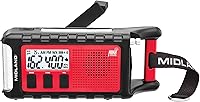
Midland ER310PRO Emergency Radio Review: Worth It? (October 2026)
The Midland ER310PRO suits emergency kits that need weather alerts, rechargeable power and a phone-charging option. It adds Bluetooth and USB-C charging to the ER310, while the Sangean MMR-99 and Kaito KA600 offer different power and radio features.
On this page (9 sections)
- Midland ER310PRO review: who is it for?
- What does the ER310PRO offer for power and charging?
- How do you set up the ER310PRO before an emergency?
- How does its NOAA weather alert feature work?
- ER310PRO vs ER310: which Midland radio should you choose?
- When should you choose the Sangean MMR-99 or Kaito KA600?
- What are the ER310PRO's main strengths and trade-offs?
- What common mistakes should you avoid?
- Is the Midland ER310PRO worth choosing?
The Midland ER310PRO is an emergency weather radio with NOAA alerts, hand-crank and solar charging, Bluetooth, and a USB power bank. It suits a home emergency kit or outdoor trip when you want one radio to provide weather updates, light, audio and occasional phone charging.
The key choice is whether those extras matter enough to share one battery across several tasks. The ER310 keeps the emergency-radio basics, while the Sangean MMR-99 and Kaito KA600 suit different priorities.
Midland ER310PRO review: who is it for?
The ER310PRO is a good match if you want multiple ways to recharge and useful features beyond weather reception. Its weather scan covers 7 NOAA channels, Bluetooth streams audio from a phone, and USB output can charge a phone or tablet.
Midland ER310PRO Bluetooth Emergency Radio: Best for Bluetooth and phone charging

- NOAA Weather Scan across 7 channels
- Bluetooth streaming
- Solar, hand-crank and USB-C charging
- 10,000 mAh power bank
A multi-power emergency radio with Bluetooth streaming, weather scanning, a flashlight and a USB power bank. Midland describes the battery as providing 200+ hours during radio use.
Pros
- Scans 7 NOAA weather channels and locks onto the strongest channel
- Offers solar, hand-crank and USB-C charging
- Can charge phones and tablets by USB
- Includes Bluetooth streaming, SOS beacon and rescue siren
Cons
- The stated 200+ hours applies to radio use, not every feature
- A phone charge uses energy that would otherwise remain for the radio
Midland describes the 10,000 mAh battery as providing 200+ hours during radio use. Treat that as a radio-use figure, not an estimate for continuous Bluetooth playback, flashlight use, signaling or charging another device.
The built-in CREE LED flashlight is rated at 130 lumens, and its SOS beacon flashes Morse code. A rescue siren is also included to help search and rescue teams locate people.
The radio is less compelling if you only need alerts at home and don't expect to use its crank, solar charging, Bluetooth or phone-charging functions. In that case, compare a dedicated weather radio such as the Midland WR120B before paying for extra capabilities you may not use.
When the Midland ER310PRO fits your emergency kit
The Midland ER310PRO fits a kit for someone who wants weather alerts, several charging choices and a way to send power to a phone. Bluetooth can also be useful for music or podcasts while camping or waiting out a storm.
Plan how you'll use its stored energy. If keeping the radio available for alerts is your priority, limit optional streaming and phone charging, and keep another phone-charging method in your emergency kit when possible.
What does the ER310PRO offer for power and charging?
The ER310PRO offers USB-C, solar and hand-crank charging for its internal rechargeable battery. Those options give you different ways to replenish power at home, outdoors or during an outage.
| Power option | What it means for you |
|---|---|
| USB-C | Recharge from a suitable USB-C power source |
| Solar | Use direct sunlight to recharge the internal battery |
| Hand crank | Recharge away from a power source or during an outage |
| USB power-bank output | Charge a phone, tablet or other portable device |
USB-C is the most straightforward choice when a suitable power source is available. Solar depends on direct sunlight, while hand cranking takes effort and time, so neither should be your only plan for keeping the radio ready.
The 200+ hours Midland describes applies to radio use. It isn't a run-time promise for Bluetooth playback, flashlight use, rescue signaling or device charging.
For more guidance on what a radio power bank can do for your phone, see our article on whether a hand-crank radio can charge your phone. The short answer is yes, but charging a phone draws energy from the radio.
How do you set up the ER310PRO before an emergency?
Set up the ER310PRO before you need it: charge it, find a spot with clear reception and learn how to use its alert and light controls. A little practice helps you avoid relying on an unfamiliar radio during a power outage.
Start with USB-C charging when you have access to a suitable power source. Then turn on the radio in the room where you expect to keep it and extend the antenna.
Let Weather Scan search for a channel, and confirm you can hear weather broadcasts clearly.
Try moving the radio to another spot if reception is weak. Interior walls and the building around you can affect the signal, so don't assume a channel that works by a window will work equally well elsewhere.
Check the flashlight, SOS beacon and siren controls, too. Keep the manual with your emergency supplies, and make a note of the working location and channel for other household members.
How does its NOAA weather alert feature work?
The ER310PRO scans 7 NOAA weather channels and locks onto the strongest one. That can make finding a receivable channel easier when you first set it up.
A weather radio still needs a usable signal to receive broadcasts. Keep the antenna extended, check the radio where you'll rely on it and repeat the check if you move it or take it to a different area.
The NOAA weather frequency guide explains how the 7 channels are used. Use it to understand local channel choices, then confirm which one comes in clearly at home or at your destination.
Don't wait for severe weather to find out the radio has poor reception in its storage spot. Check it periodically, especially after rearranging your emergency supplies or moving the radio.
ER310PRO vs ER310: which Midland radio should you choose?
Choose the ER310PRO for Bluetooth and USB-C charging details, or consider the ER310 if those extras aren't important. Both are Midland emergency radios with weather alert and flashlight features.
Midland ER310 Emergency Crank Radio: Best for a simpler Midland option

- NOAA weather scan and alert
- Multiple power sources
- SOS flashlight and dog whistle
- USB device charging
The earlier ER310 keeps the core emergency-radio role with NOAA alerts, a flashlight and multiple power sources. Choose it if you don't need the PRO model's Bluetooth or USB-C details.
Pros
- NOAA Weather Scan and alert
- Multiple power sources
- SOS flashlight and ultrasonic dog whistle
Cons
- Bluetooth streaming is not listed as a feature
- USB-C charging is not listed as a feature
| Feature | ER310PRO | ER310 |
|---|---|---|
| Weather alerts | Scans 7 NOAA channels and locks onto the strongest | NOAA Weather Scan and alert |
| Charging details | Solar, hand crank and USB-C | Multiple power sources |
| Phone charging | USB output for portable devices | Smartphone and tablet compatibility |
| Bluetooth | Yes | Not stated in the product data |
| Emergency light | 130-lumen CREE LED and SOS beacon | SOS emergency flashlight |
| Other alert aid | Rescue siren | Ultrasonic dog whistle |
The ER310PRO is the clearer fit if USB-C, streaming or its stated battery capacity affects your decision. The ER310 is worth considering if you prefer the simpler feature set and don't need Bluetooth.
The available power details for the ER310 are less specific, so confirm that its charging options match your needs before choosing it. For a broader look at Midland's weather-radio range, see Midland weather radios compared.
When should you choose the Sangean MMR-99 or Kaito KA600?
Choose the Sangean MMR-99 if its IP55 dustproof and waterproof rating is a priority, or the Kaito KA600 if you want more radio bands. Neither is an across-the-board replacement for the ER310PRO; each suits a different use.
Sangean MMR-99 Multi-Powered Weather Radio: Best for dust and water resistance

- 7 NOAA weather channels
- Hand crank, solar and USB-C charging
- IP55 dustproof and waterproof rating
- Bluetooth and USB-A device charging
The MMR-99 combines NOAA channels and Public Alert with multiple charging options, Bluetooth, and an IP55 rating. Its rechargeable battery is 2,600 mAh.
Pros
- IP55 dustproof and waterproof rating
- Hand crank, solar and USB-C power options
- USB-A output for charging smaller devices
- Bluetooth, presets and SOS lighting
Cons
- Smaller stated battery capacity than the ER310PRO
- The stated IP55 rating does not mean the radio can be submerged
The MMR-99 combines hand-crank, solar and USB-C charging with 7 NOAA Weather Channels, Public Alert, Bluetooth and USB-A device charging. Its IP55 rating may be useful when dust and water resistance matter, but it doesn't mean the radio can be submerged.
Kaito Voyager Pro KA600 Radio: Best for extra radio bands

- AM, FM, LW and SW bands
- NOAA weather channels
- Solar and hand-crank power
- Flashlight and reading lamp
The KA600 covers AM, FM, longwave and shortwave alongside NOAA weather channels. It also has solar and hand-crank power, a flashlight, a reading lamp and a phone-charging feature.
Pros
- Covers AM, FM, LW and SW bands
- Includes NOAA weather channels
- Has both a flashlight and a reading lamp
- Multiple power sources
Cons
- USB-C charging is not listed as a feature
- Bluetooth is not listed as a feature
The KA600 receives AM, FM, longwave and shortwave as well as NOAA weather channels. It also has solar and hand-crank power, a flashlight, a reading lamp and a phone-charging feature.
Pick the ER310PRO if Bluetooth, USB-C and its 10,000 mAh battery are the deciding features. Consider the Sangean for its resistance rating or the Kaito for longwave and shortwave reception.
What are the ER310PRO's main strengths and trade-offs?
The ER310PRO puts weather scanning, rechargeable power, light and device charging in one radio. That can simplify an emergency kit, as long as you account for how several features draw on its stored energy.
Its most useful features for preparedness are the NOAA weather scan, three battery-recharging options, phone-charging output, flashlight, SOS beacon and rescue siren. Bluetooth adds everyday use between emergencies.
The main trade-off is shared battery use. Streaming, lighting and phone charging use energy that would otherwise remain available for listening to radio broadcasts, so make a simple plan for which features matter most in an outage.
It is an emergency radio, not a two-way radio for talking to another person. If you need communication between people, our two-way radio starter guide explains the difference between that job and receiving weather broadcasts.
What common mistakes should you avoid?
Avoid putting the radio away without charging it or checking reception. A hand crank and solar panel are useful backup options, but they work best as part of a plan made before an emergency.
- Don't assume a weather channel will be clear from every room; check the radio in its storage spot.
- Don't treat the 200+ hours figure as the expected run time for every feature.
- Don't leave phone charging and Bluetooth on without considering the battery they use.
- Don't rely on sunlight if the radio will be stored somewhere dark or kept in a bag.
- Don't wait until an outage to learn the controls for the flashlight, SOS beacon or siren.
Make a quick periodic check part of your household routine. Confirm the radio powers on, can receive a broadcast in its usual spot and has enough charge for the role you expect it to play.
Is the Midland ER310PRO worth choosing?
Choose the Midland ER310PRO if you want NOAA alerts, multiple ways to recharge, Bluetooth and phone charging in one emergency radio. It's especially useful when you'll make regular use of both its emergency features and its everyday audio.
Consider the ER310 if the PRO model's Bluetooth and USB-C features don't matter to you. Choose the Sangean MMR-99 for its stated IP55 rating or the Kaito KA600 for extra radio bands, and start with our hand-crank radio guide if you want to compare more options.
Frequently asked questions
What is the difference between the Midland ER310PRO and ER310?
The ER310PRO adds Bluetooth streaming and USB-C charging details, along with a stated 10,000 mAh battery. Both models are described as emergency radios with weather alerts, multiple power sources and a flashlight.
Compare the features you will use before choosing, especially if streaming or USB-C input matters to you.
Can the Midland ER310PRO charge a phone?
Yes. The ER310PRO can charge phones and tablets through its USB power-bank output using the included USB charging cable.
Keep in mind that charging another device draws from the radio's stored energy, so save that option for when your phone needs it.
Does the ER310PRO receive NOAA weather alerts?
The ER310PRO scans 7 available NOAA weather channels and locks onto the strongest weather channel to alert you to severe weather updates. For dependable reception, place the radio where it can receive a clear signal and confirm your local channel during setup.
Is the Midland ER310PRO a hand-crank radio?
Yes. The ER310PRO can recharge its internal lithium-ion battery with its hand crank, direct sunlight or USB-C.
Those options give you ways to replenish power during an outage or away from an outlet, but the radio still needs to be charged and checked before an emergency.