Walkie Talkie Channels and Privacy Codes Explained
Walkie talkie channels are shared radio frequencies, and privacy codes filter which transmissions your radio plays. They don't make your conversation private or encrypted.
On this page (9 sections)
- What are walkie talkie channels?
- What do privacy codes do on walkie talkies?
- How do you choose a clear channel?
- How do you match channels and codes between radios?
- Can FRS and GMRS radios use the same channel?
- What should you avoid saying over a walkie talkie?
- Which walkie talkie features matter for channel use?
- What is the simplest channel plan for a group?
- How should you choose walkie talkie channels and privacy codes?
Walkie talkie channels are shared radio frequencies, while privacy codes filter which transmissions your radio plays. They do not make your conversation private or encrypted.
To talk with someone, set both radios to the same channel and, if desired, the same privacy code. If another group is already using that channel, you may hear them or need to switch.
What are walkie talkie channels?
A walkie talkie channel is a preset radio frequency your device uses to send and receive voice. Two radios need to use compatible radio services and the same channel to communicate.
Many FRS walkie talkies offer 22 channels, though some models provide fewer or more menu options. The channel number is a convenient setting, not a private lane reserved for your group.
Other people nearby may use the same channel. If two groups transmit at once, their voices can overlap or interfere.
For a broader introduction to radio types and basic use, see our starter guide to two-way radios and emergency weather radios.
What do privacy codes do on walkie talkies?
Privacy codes are audio filters, often based on CTCSS tones or digital codes. Your radio can be set to play transmissions only when it detects the matching code.
The code is sent along with your transmission, but it doesn't block anyone else from listening. A radio set to the same channel without a code may hear your conversation, and another radio using a compatible receiver may also monitor it.
The term “privacy code” can be misleading. These settings help reduce unwanted chatter in your speaker, but they don't give you a private or secure conversation.
Are privacy codes the same as channels?
No. A channel selects the frequency, and a privacy code adds a tone or digital filter on that channel.
You can think of the channel as the shared place where radio traffic travels and the code as a filter for what your radio plays.
Two users can be on the same channel but have different codes. They may not hear each other through their speakers, yet either could still hear a transmission if their radio's code filter is turned off or set to match.
What is the difference between CTCSS and DCS?
CTCSS uses low-frequency tones, while DCS uses digital codes. Both are ways to filter received audio, and neither encrypts your voice or prevents others from monitoring a channel.
Radio brands may label these settings differently. One may call them privacy codes, another may list CTCSS and DCS separately, and code numbers can vary between models.
How do you choose a clear channel?
Choose a channel that sounds quiet when you listen or scan, then agree on the same setting with everyone in your group. If you hear another conversation, switch channels and check again before starting.
A channel that sounds clear now may become busy later. Keep a backup channel in mind and tell your group how you'll switch if you lose contact.
When selecting a privacy code, use the same code on every radio in your group. If you're trying to hear all traffic on the channel, turn the code filter off.
How does channel scan help?
Channel scan checks channels for active radio traffic. If your walkie talkie has a scan feature, use it to find activity before choosing a channel.
Scan is a useful starting point, but it only detects activity while it is listening. A short transmission may end before the scan reaches that channel, so listen manually for a moment before talking.
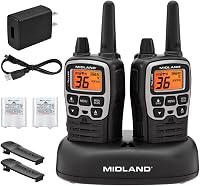
The Midland T71VP3 X-Talker Radios, 2 Pack has 36 FRS channels, a channel scan feature, and 121 CTCSS privacy codes. Match the channel and code settings across your group.
How do you match channels and codes between radios?
Set each radio to the same channel, then match the privacy code if you want to filter audio. Have one person transmit briefly while the others confirm they can hear clearly.
Check the code system as well as the number. A “privacy code 5” on one brand may not correspond to code 5 on another, so consult each radio's instructions if the devices don't connect as expected.
If you can't match a code, try turning the privacy code off on both radios. Keep the channel the same, then check whether the radios can communicate.
The Retevis RT22 FRS Walkie Talkies, 4 Pack has 16 FRS channels. The RT22 can communicate with other Retevis FRS 16-channel radios set to the same channel.
Can FRS and GMRS radios use the same channel?
Some FRS and GMRS radios can communicate on shared channels when both are set to compatible frequencies and settings. Radio service rules still matter, especially if a GMRS radio is involved.
FRS radios are license-free. GMRS operation generally requires an FCC license in the United States, so check the rules that apply to your equipment and use.
For channel details and licensing context, read what GMRS radio is and whether you need a license and our guide to GMRS channels and frequencies. Don't assume that matching channel numbers alone mean two radios are compatible.
What should you avoid saying over a walkie talkie?
Treat an ordinary walkie talkie conversation as something others may hear. Avoid sharing passwords, personal details, or sensitive plans over an unencrypted radio channel.
Use short, clear messages and agree on simple call signs or check-in points with your group. If you need private communication, use a communication method designed to protect messages.
Which walkie talkie features matter for channel use?
A radio's channel count and code options matter only if they fit how your group will communicate. Everyone needs compatible radios and a shared plan for channel, code, and backup settings.
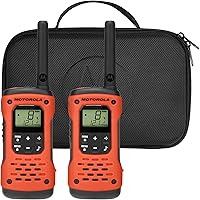
The Motorola Talkabout T605 H2O has 22 channels and 121 privacy codes. It's an FRS model with easy pairing, which may help a group set matching radios before heading out.
If you expect to use radios around water, this model is also rated IP67 waterproof and designed to float face up. Those features relate to handling the radio, not to channel privacy.
For trips where water resistance matters, compare waterproof walkie talkies. If your group is planning a cruise, see our guide to using walkie talkies on cruise ships for setting expectations about radio use in that setting.
What is the simplest channel plan for a group?
Pick one main channel and one backup, then agree on whether to use a privacy code. Share the exact settings with every person before you split up.
If another group is using the main channel, switch everyone to the backup. A code change alone won't move your conversation to a different frequency or make it private.
For a group heading outdoors, the walkie talkies for hiking guide can help you compare features suited to carrying radios on the trail.
How should you choose walkie talkie channels and privacy codes?
For everyday group use, choose a quiet channel, match settings across radios, and treat every conversation as public. Use privacy codes only to filter unwanted audio, not to hide your messages.
Choose a radio with scan if you want help checking channels, or one with enough code options for groups that need to coordinate. If your plans involve GMRS, review the GMRS channel guide and licensing rules before transmitting.
Frequently asked questions
What is a privacy code on a walkie talkie?
A privacy code is a tone setting, often called a CTCSS tone, that lets a radio play transmissions only when they carry the matching tone. It doesn't reserve the channel or stop other people from hearing you.
For a clear conversation, choose an open channel and agree on the same code with your group.
Do privacy codes make walkie talkies private?
No. Privacy codes filter what you hear, but they don't encrypt your voice or prevent another radio from monitoring the channel.
Someone using the same channel without a code, or with a compatible receiver, may still hear your conversation.
Don't share sensitive information over ordinary FRS walkie talkies.
How do I find an open walkie talkie channel?
Use your radio's channel scan if it has one, or listen on a channel before your group starts talking. If you hear activity, move to another permitted channel and check again.
Remember that a quiet moment doesn't guarantee the channel will stay clear, since other users may begin transmitting later.
Can different walkie talkie brands talk to each other?
Often, yes, if both radios use the same service and are set to the same channel and compatible privacy code. Brand names and code numbers may differ, so match the actual tone or code setting when possible.
FRS and GMRS radios can share some channels, but GMRS use has separate FCC licensing rules.